Haas Programming Guide
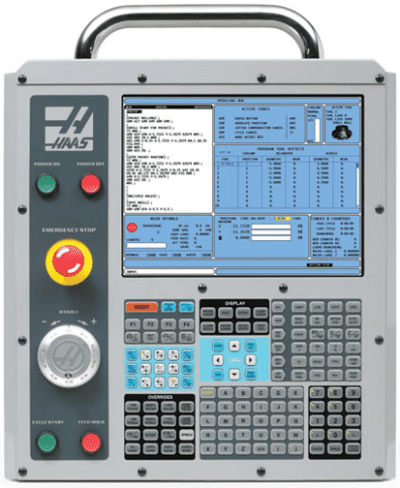
Category:, CNC Help, this article is about the different modes of operation on a CNC Machine Depending on what mode you are in. Zero Return. Jog.
Handwheel. MDI. Memory/Auto/Full Run. Drip Feed/Tape. Edit This determines what you can do on the machine.
CNC Help Zero Return So when we turn on the machine we would need to zero return the machine. What is Zero Return you ask? Well when you switch on the machine it’s a bit like when you wake up the next day after drinking a whole bottle of whisky.
First thing you think is where am I? Then the memories flood back of how you were dancing naked on the bar. A CNC machine is much the same (except they don’t get pissed).
So you need to let the machine know where it is. We move the machine back to it’s zero position and on the way it triggers a dog which is like passing over a button. This tells the machine where it is. You’ll notice it slows down as it passes over this dog. That gives it time to sort itself out.
Not a real dog you turkey that would be cruel I mean a switch. You only need do this when you first turn on the machine. After that the machine always knows where it is.
CNC Help Jog Jog what’s Jog? Well in this mode you will have an X Y and Z buttons. You will also have a feed control. (A knob to you) A bit like when you turn the music up. This determines how fast your axis will move when you press X Y or Z in the plus or minus direction.
This very often has a rapid button that you can hold in to make the moves really fast. So you can use this to move your axis around. You could even use it to drill a hole or face mill a part. CNC Help Handwheel When you use the handwheel you would normally be required to select an axis and an increment as below. If you selected the X axis and an increment of 0.1 then each click of the handwheel will move the X axis 0.1mm. The handwheel always reminds me of the robbers cracking the safe in the old movies. Again you can use the handwheel much like jog to get the machine in the position you want and maybe drill a hole or something.
Haas handwheels have a really course setting like 1mm a click so beware!! But it’s great for quickly getting around the machines. Just remember that these articles are designed as general guidelines as machines will vary. If you use the analogy of driving a car then it’s like borrowing your mates car.
It will definitely have lights and indicators. You just got to find where the switches and buttons are. CNC Help Incremental Jog Just thought I’d add this in. Some machines have an incremental jog and I suppose it’s a bit of a combination between handwheel and jog. You select an increment and each time you press the axis button (XYZ) the machine feeds that amount. Very useful for clocking in bores and stuff like that.
Personally I like the idea and if I worked on a machine with this I’d be using it. CNC Help Safety It’s important to remember that handwheel and jog can usually be used with the door of the machine open. They may seem gentle and there’s not much noise going on. Please note you are using the full power of the machine and if your hand is in the way the handwheel will not stop. CNC Help MDI Remember that these modes may have slightly different names but all CNC machines will have them. Like on some Siemens controls MDI is called MDA (don’t google that one!!!) Manual Data Input (I suppose it’s kind of self explanatory). It’s just a way of writing little short bits of CNC code and it’s normally automatically deleted after use.
You could use this for things like doing a tool change or starting the spindle. Almost anything that you would put in a programme can be done in MDI. It is usually used once and thrown away, not really environmentally sound. Most controls have a way of converting this MDI programme into a permanent one to keep in memory. Fanuc uses program O0000 for MDI and it’s a bit like a clipboard. You can change this programme O0000 to a real programme number like O0001. There is also a after you used it.
Some operators only use MDI for tool changes so you might want to keep the code there for whenever you need it. Moan Moan Moan On a Fanuc control you have to put an EOB (end of block or semicolon) at the end of the line of code to make it work. Otherwise you get an alarm. Drives me bonkers.
CNC Help Memory/Auto/Full Run This mode can have different names but it’s the mode where you get to run your programme. After selecting the programme you want to use select this mode.
When you press cycle start the programme will run. And that red button at the side there is feed hold, it will halt the programme movement but it won’t usually stop the spindle from rotating. Drip Feed/Tape This mode is usually for running direct from a Memory Card or PC and it varies from machine to machine.
Some will run direct from a floppy disc. It is for those massive programmes too big for the machine memory. Some really old machines will even run a paper tape. Anyway you don’t need to worry your pretty little head about that one at the moment. Minolta DSC Picture of a floppy disc for our younger viewers.
Let’s get on to the interesting shit. CNC Help Edit Edit well it’s kinda when you edit. Yes it’s when you alter the programme. In the edit mode you can look at any of your programmes stored in your machine and Edit them. There are massive differences in what you can do depending on your CNC control. Don’t get me started on this one cos I think CNC Machines have been in the stone age on this one for years.
Haas Programming Training
Now I’m not going to mention names but even simple things like copying programmes can be an absolute piece of shit. So if your used to the power of editing on a PC get ready to go back in time. Most new machines are pretty good on this now but it’s taken a long time and I still find it really convoluted and counter intuitive. (I don’t know what either of those words mean).
Here is a short it’s very similar on most oldish Fanuc controls. (Excuse the long intro on the video but I am trying to flog records as well here). Oh and if you want to copy a programme on an Editing in its simplest form is INSERT ALTER and DELETE.
These are self explanatory but I have put a nice little gif above just to hold your attention. Most modern controls will have FIND and REPLACE. It is well worth learning to use this because it guarantees that you don’t miss any figures in your programme.
Like if you had X57.65 in your programme six times if you use FIND/REPLACE to change em all to X57.66. You are sure to catch them all and you can be sure they are all accurate. Even if you altered em to the wrong figure at least they will all be the same. Or just get in touch. Category:, This article will explain all you need to know about tool length offsets. Ok so you managed to write a CNC Programme for your CNC Milling Machine, well done.
A programme is a set of instructions telling your CNC Machine exactly how to machine your component. It contains all the necessary tool paths XY figures and Z depths. It also contains on off signals to do things like starting the spindle (M3 clockwise M4 counterclockwise).
All the feeds and speeds for your tools. Lots of software like can perform full collision detection. You have a model of every tool and it’s holder. There is full model of the machine and all the workholding. Edgecam will even tell you if the flute length of the tool is too short!
Ok so that is all great so far but when we put this programme in the machine to run there are three things the machine doesn’t know. Can you guess what they are?
No it doesn’t know jackpot winning lottery numbers (that would be four things it didn’t know). It doesn’t know where the part is in the machine coordinate system. It doesn’t know how long the tools are (tool length offsets). It doesn’t know the diameter of the tools. Vital information wouldn’t you say? So first of all we use the Work Offsets to tell the machine where the part is.
Please don’t worry if you don’t know how to do this after all this is beginners help with tool length offsets. Your mates don’t know your reading it, you can tell them you already knew. So in the picture above we would touch the spindle nose onto the Z datum of our workpiece. This would tell the machine where the part is in the Z axis. This distance is input into our work offset table (in this case G54).
If we now programme G0 G54 Z0 the spindle would rapid down to this position (G54 is where the values are stored). We wouldn’t do this by the way cos the machine would crash. What we now need to do is take into account the length of the tool. We would measure each tool length and store it in our tool length offsets file.
This tool length offsets file stays in the machine and is independent of your CNC Programmes. So now any programme can access this file.
So how does it do that? It uses G43 and G43 says “ok get me a tool length offset” G0 G43 Z3. H1 Which tool offset?? Well that’s the H number. So the line above says to the machine rapid to Z3. Oh and by the way allow for the length of Tool 1 before you get there.
That’s the H1 So it gets the tool length from the tool length offsets file. It then does all the maths for you. Actually it’s just a bit of simple arithmetic. Your (G54) work offset) minus your tool length. Your tool will arrive 3mm above your component. So whatever tool you called into the spindle with your M6 command you need to use the corresponding H number. M6 T5 (Get tool 5 in the spindle) G90 G0 G54 X0 Y0 S1500 M3 (Rapid to X0 Y0 and start the spindle) G43 Z3.
H5 (Rapid to Z3. But allow for the length of tool 5) How do you measure the tools? Well some people use a bit of paper!!! And some buy one of these babys. And if your a very good boy you might get one of these for christmas. Auto tool measurement (yes it’s all done for you) In the cases above we are storing the actual tool length in the offset file. Now let’s take a look at that tool file again.
Some of my readers are very astute but before you start writing me an email or commenting on this article. “oh David it looks like you fucked up again” I know Why are the tool lengths (Under Geometry) minus figures? That’s because as always there are several ways to do this. What some people do (and I am not one of them) is They bring each tool down from zero return and touch on the part. This figure is then recorded in the tool length offsets file.
And yes it’s a minus figure. Of course the G54 work offset would be zero in the case of Z.
Now I am not prepared to argue with you about this (your doctor told me not to). It’s just bad. That figure has no relation to the actual tool length and you need to reset every tool for every Job!! I’m saying no more I’ll just wait for the comments.
Actually there is something else to consider. (I know I said I’m saying no more).
Setting yout tool length the correct way the stored offset is the actual tool length and you can do a rough check with your steel ruler when your proving your programme. Auto tool length measurement will always give actual tool length and so will a tool presetter. That means you can swap tools between machines. A Few Other Things About Tool Length Offsets If you have a.
Mmmmm if you have a Mazak. Well it’s easy. Mazak machines have active offsets so the minute you do a tool change and get your tool in the spindle the tool lengths offsets are active. Well you don’t need a G43 and you don’t need the H M6 T5 (Get tool 5 in the spindle) G90 G0 G54 X0 Y0 S1500 M3 (Rapid to X0 Y0 and start the spindle) Z3. (Rapid to Z3. But allow for the length of tool 5) Forget the G43 H5 shit. Those Mazak guys just don’t believe in stating the obvious.
Just remember you can change this by parameter if you want it to work the same way as your Fanuc or your Haas. That way you can put programmes from your Fanuc into your Mazak and vice versa. One other thing.
You can alter the settings on a Haas machine so that if your H and your T are not the same you get an alarm. M6 T5 G90 G0 G54 X0 Y0 S1500 M3 G43 Z3. H1 Remember our programme. If you changed the tool number but forgot to change the H you would be using the length of T1 for T5 Yes you just bent your machine. Of course if it’s a Haas you just get an alarm. Category:, How do you become a CNC Machinist? Every day at the CNC Training Centre we get calls from people wanting to get a job as a CNC Programmer or CNC Machinist.
We can’t get you a job but we can get you started on the path. That’s why we put these courses together. These courses are designed to get you started on CNC Machining. If you are a beginner and want to do a hands on course that teaches you to become a setter operator then try these two courses. These are ideal if you think you can get a start on the ladder and don’t want to jump in at the deep end. For absolute beginners with no previous experience.
If you work on a CNC machine already and you want to advance by learning some programming skills then look at these two courses. It’s important to realise that there is absolutely no guarantee that you will get a job at the end of this training. Or a company car. Read to the end of the article for the good news. These are two day courses but it will take years to become a skilled machinist. These courses are for people who have little or no experience and the idea is to get you on the first rung of the ladder.
Starting with moving the machine around in Manual Mode. To creating simple programmes. You’ll learn some basics about measuring equipment. And we’ll teach you about the common materials used in manufacturing. Well maybe not gold but steel, brass, aluminium and stainless steel. I served my time at Rolls Royce as an apprentice circa 1971 (do the maths I’m a real old git).
Well maybe not that old. It took four years before you could even start as a proper engineer.
Even then there was a kind of unwritten rule that you still needed a fair bit of time before you actually would be any good. In them days there weren’t many people who could call themselves a CNC Machinist. That technology was in its infancy.
There were over 200 apprentices at Rolls Royce then. If you add to that all the other companies in Coventry alone. The pool was massive. Manufacturing was destroyed in the UK in the 1980’s.
Let’s not get political. But it isn’t any better now. Before I put you off all together and you start looking into hairdressing let’s give you the good news. The Good News There is a huge demand for CNC Programmers, Machinists, Setters and Operators. That means it’s a good trade to be in. Employers are inclined to take more of a risk as a result. More Good News There are no filters.
Engineering is still old school if you can do it you’ll more than likely get the job. In the smaller companies no-one cares too much about what qualifications you have if you can do the job.
Please don’t quote me on this it’s just an observation. So that means if you’re a quick learner and you study hard you got a good chance. Suggestion To Become a CNC Machinist Do anything you can to get started in a small CNC Machine shop.
Cleaning up, making the tea anything. There is a good chance if you keep getting in the way, one day when they are really busy you’ll get a chance to run a CNC machine. Mine is a single-shot-caramel-soya-latte in a Chevron Denby cup. The number one criteria is to be reliable!! Colleges are a good place to get the basic training as an engineer but you’re probably not in a position to go to full time college.
You may well have to take a drop in salary to get started but try not to think about the money. That’s easy for me to say. What I mean by that is if you get any opportunity to learn then grab it.
It may mean working over or coming in at the weekend but. The learning is yours forever. We offer and before I start working with my students I always talk to them about their own personal development. The company they work for is spending a lot of cash to train them and will gain massively from the training. The student will be a lot more valuable as an employee. That student may even get a pay rise.
The real gain Knowledge is power. Now I don’t mean you can go and invade some rich oil state or become a judge on the X Factor.
Your value on the job market is now much higher so every opportunity to learn you need to take. Don’t get me wrong a pay rise is lovely and not to be sniffed at but it’s only as good as it lasts. When you lose your job there is no guarantee you will get paid as much in your next position. What I always say to students is that if they get made redundant they will gladly pay for college courses or training courses. They will in fact expect to pay. So when offered any kind of training in the workplace keep this in mind.
That is if you want to become a CNC Machinist. When you get a chance to go onto a new machine or learn don’t hesitate.
Yes you are helping the company but even if they don’t realise that think if your own personal development. Remember knowledge is power. Thanks for reading. Category:, CNC beginners guide (using Single Block) This article CNC beginners guide is about Single Block and how it is used. When you write a CNC programme it will consist of blocks of programme.
What is meant by a block? Well it’s everything until the control sees a semicolon; The semicolon is called an end of block or EOB Try not to confuse this with a line of code. Depending on how your screen is set out a block could be more than one line. The control reads everything until it sees the semicolon or EOB (End of block). In most cases and on most controls it does not matter what order the code is in. The main reason to follow a set pattern for your code is to make it Try to always put things in the same order. In one block of code you can have loads of stuff.
You could write: G0 X50. S1500 M3; But if you wanted you could put the S1500 M3 on a different line. When doing this think about why you might want to do it. For example you may want to get the tool ready to use before switching on the spindle or the coolant. This saves the excitement of the spindle wizzing round when proving the programme. Oh yes and you could get soaked. Most of this applies when you first test your programme.
This is when we use single block. The Switch To run a programme in Single Block we have to throw a switch. This can be a normal Single Block switch or a button or a soft key.
Read the article below to learn how to prove out your CNC programme in Single block. Once single block is enable the machine will do exactly what it says on the tin. It will run that block and wait for its next command like a good doggy. The beauty of this is you only need to think about one block.
If you turn single block off the machine will still stop at the end of it’s current block and wait for another press of CYCLE START button to carry on. Also when you first turn single block on it will stop at the end of the block it is executing.
Those of you who read my articles will know that I love these old (they make me feel young again). Anyway these machines have a one line display so you have to step through to read each line. I once input a whole programme into one of these controls not realising I had no end of blocks. (Now I would never say fuck in one of my articles so I will refer to it as the F word.) On this occasion I said the F word after taking about an hour trying to realise why the programme wouldn’t work. The whole program was in one block!!! Don’t mix your G Codes Let’s continue with this CNC beginners guide to CNC programming. In one block of CNC code you can only have G codes that belong to the same group.
I’ll tell you about this in another article when I can be bothered to do it. Anyway it’s easy, they can’t argue with one another. You can’t put on the same line for example because they are in the same group. You can’t say feed and rapid in the same line. That would be stupid.

Obviously you can’t repeat things like having two speeds in the same block. G0 S1200 X50.
S2000; I don’t think anyone who reads my articles is that stupid. Except for that bloke in Bolton, but I think he took up plumbing in the end. If you have a Heidenhain control the single block works the same. You select Full Run or Single Block You don’t hear me criticise Heidenhain very often cos I love em.
Brace yourselves cos I’m about to. Those bloody icons. They all look the same. Everytime I come back to working on Heidenhain I can never remember which is which. I sometimes suggest making little sticky labels to go underneath to identify them. This one will do wonders for your relationship with the guy on nights. Oh and Before You Go A Few Other Things.
What about a tool change?. What about a canned cycle?. What is the meaning of life?
Ok the last one is easy. Right, now the difficult ones. Your tool change M06 is probably aliased to a This means that a programme is running in the background that you can’t see. Single block may well be inhibited. This means one press of the CYCLE START button will do the tool change. Sometimes however single block works. In this case it will take loads of presses to get through the tool change.
This is the sort of thing that’s running in the background. I won’t go too much into this, afterall it is a CNC beginners guide.
Depend on parameter settings. It will normally be one press to rapid to the R Point. Then one press to drill the hole. It may or may not need another press to bring the drill out of the hole. The exception is. You definitely wouldn’t want single block to work on this. Imagine the tap gets to the bottom of the hole and sits there waiting for a push of the button.
Sometimes feedhold is inhibited too in a. Hope you enjoyed this CNC beginners guide Services offered at CNC Training Centre. Mazak Training Fanuc Training Don’t forget we offer training on all types of Mazak Machines and all 6m to 31i Oi old to young. Category:, CNC Milling G02 G03 to produce a full circle on a Fanuc or Haas G code type programming system is really easy. Last week I was training four very experienced programmers and I asked them how they would programme a full circle. The answers they gave shocked me, I had to take out my hip flask and drink a large shot of brandy.
What they were doing was perfectly correct but definitely not the simplest way. One said he broke the circle into two halves. One said he copied some code he already had in the machine. The other one said he got the bloke who did it in two halves to do it for him. Oh and the other one used I and J and X and Y.
OK so just imagine you want to mill internally around a 40mm diameter circle. CNC Milling G02 G03 to Produce a Full Circle, here’s the code. First in two halves G0 X0 Y0 S1500 M3 G43 Z3. H01 M8 G1 Z-5. (Apply Cutter Compensation) G3 X-20.
(First Half) X20. (Second Half) G1 G40 X0 Y0 (Cancel Cutter Compensation) G0G53Z0 All in one complete with wasted Code G1 G41 X20. J0 (Mill Full Circle) G1 G40 X0 Y0 But this is really all you need G1 G41 X20. (Mill Full Circle. Sooo Simple) G1 G40 X0 Y0 Remember that song by the Average white Band “Let’s Go round Again”?
I used to love it. Ok let’s go round again. It’s so easy and it saves leaving a mark. (Mill Full Circle) I-20.
(Lets go round again) G1 G40 X0 Y0 Now if you have a Toshiba with Tosnuc control or Haas or maybe a Yasnac CNC control. CNC Milling G02 G03 to produce a full circle you just need this: G13 D1 I20. (Everything all in one) G13 (Counter Clockwise) G12 (Clockwise) D1 (Use offset 1) I20. (20mm Radius) G13 does everything.
It’s like an all inclusive holiday except you don’t gain weight and you’re not pissed everyday. How cool is that and you get a tangential approach. No need to contact your legal team it’s not a predatory sexual advance. It just means you approach the circle using in a circular move. You sort of creep up when it’s not looking. Know what I mean?? Here is a nice picture to demonstrate.
Think about it, why would we do this? Well the older and more inaccurate your CNC machine is the more likely it is that your machine will leave a mark at the entry and exit point.
This is also dependant on the material and the size of the cut you are using. A quick workaround for this is to just go round the circle twice (let’s go round again). It very often does the trick.
CNC Milling G02 G03 Oh by the way if I saw a tangential move that big I would think it was a wasted move. (It’s just to demonstrate). You only need a short tangential move to do the job. The easiest way to programme a tangential approach is like the ones above. Coming in from North, South, East or West on the compass.
Now look at this. This is the best way, although it’s more difficult to programme. I think it’s South West on a Compass?? The reason is that there is no axis change of direction and no animals are injured or hurt in any way during the process. If you watch the movement above and watch carefully what the X axis is doing. It changes direction before it is in contact with the circle.
And the same thing on the way out of cut with the Y axis. Direction Change When Using G02 G03 to mill full circle When milling a full circle each time an axis changes direction there is a chance you will be left with a visible mark on the circle. These points are North South West and East on a compass. Watch below to see where these points are.
If you have a new machine there should be no visible mark on this change of direction. On an old machine this can be really noticeable and cause real problem.
I have been working on a 12 year old Mazak Horizontal machine recently and was amazed at just how good a circle it produced. It beats the shit out of using a reamer. Oh and you can easily adjust the size with your D offset. If you do use circular milling to produce a bore just remember that if your cutter is not parallel then your bore won’t be either. So don’t use that crappy old re-ground cutter.
Try n get the boss to buy you a shiny new one. Oh and just one other thing. Measure the bore at the top and the bottom. Lets Come Back To The Programme G1 G41 X20.
G1 G40 X0 Y0 There are actually four choices which produce four totally different circles. And potentially a scrap part. Pre-k saxon phonics.
Haas Programming Manual
So use those machine graphics to check your code if you got em!! (The one on the left and the one we used) G3 I20. (The one on the right) G3 J20. (The top one) G3 J-20. (The bottom one) Here They Are In Action CNC Milling G02 G03 Thanks For Reading Call David: 0333 939 8388 Learn CNC Programming Services offered at CNC Training Centre. Mazak Training Fanuc Training Don’t forget we offer training on all types of Mazak Machines and all 6m to 31i Oi old to young.